Table of contents
Open Table of contents
- The Hard Reality of Running Kafka on Kubernetes
- 1. What Is Strimzi & How Does It Work?
- 2. Strimzi Custom Resource Definitions (CRDs) Deep-Dive
- 3. Network Listeners & Security Architecture
- 4. Hands-On Tutorial: Deploying Kafka with Strimzi Step-by-Step
- 5. Production Best Practices for Engineers
- Summary & Developer Takeaways
The Hard Reality of Running Kafka on Kubernetes
Apache Kafka is one of the most powerful distributed event-streaming platforms in the world. However, if you have ever tried running a production Kafka cluster manually inside Kubernetes using standard StatefulSets and raw Deployment manifests, you know how painful it can get:
- Stateful Cluster Management: Kafka brokers aren’t stateless containers. Each broker has a unique ID, manages distinct topic partitions, and requires stable persistent storage (
PVCs). - Metadata Synchronization: Brokers must coordinate metadata via Zookeeper or KRaft (Kafka Raft quorum).
- Day-2 Operational Toils: Creating topics requires executing CLI scripts inside running pods; adding ACL authorization rules involves modifying znode paths or SSL stores; and performing rolling broker upgrades requires carefully reassigning partition leadership to avoid data loss.
This is where Strimzi comes in. Strimzi is an open-source CNCF Sandbox project that brings the Kubernetes Operator Pattern to Apache Kafka. It allows you to provision, configure, secure, and manage Kafka clusters entirely using declarative Kubernetes YAML manifests.
1. What Is Strimzi & How Does It Work?
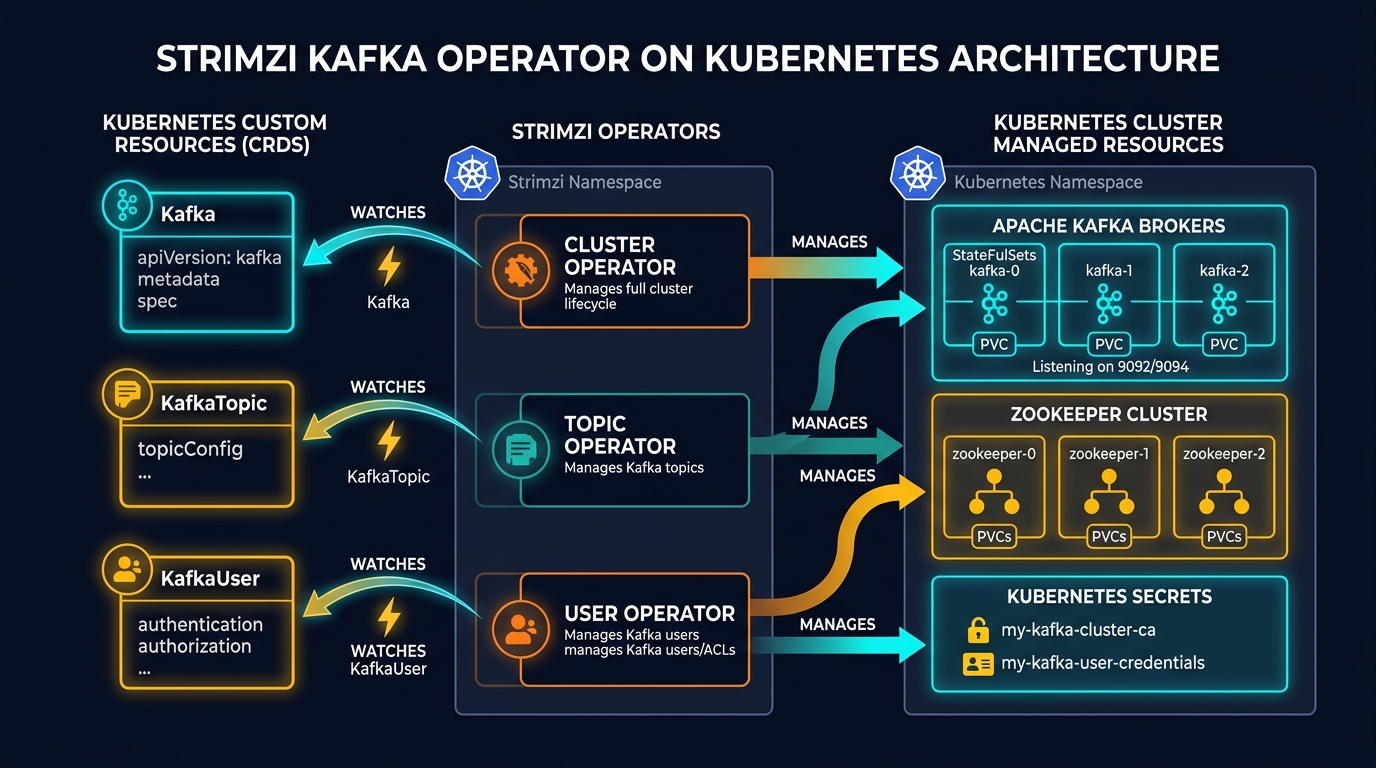
Instead of SSHing into Kafka nodes or writing custom Bash scripts, Strimzi introduces Custom Resource Definitions (CRDs) into your Kubernetes cluster. When you apply a manifest like kind: Kafka or kind: KafkaTopic, Strimzi’s active Operators catch those events and automatically execute the required operations.
The Three Core Strimzi Operators
Strimzi is modular and uses three specialized operators working together:
- Cluster Operator (CO):
- Role: The brain of the installation.
- Responsibility: Listens for
Kafka,KafkaConnect,KafkaMirrorMaker2, andKafkaBridgecustom resources. It provisions and manages the underlying Kafka broker StatefulSets, Zookeeper/KRaft quorums, Kubernetes Services, and TLS certificates.
- Topic Operator (TO):
- Role: Synchronizes Kafka topics declaratively.
- Responsibility: Watches for
KafkaTopiccustom resources in Kubernetes and uses the Kafka Admin API to create, modify, or delete topics inside the live Kafka cluster. It also supports bidirectional sync (if a topic is created inside Kafka via CLI, the Topic Operator generates a matchingKafkaTopicCRD in Kubernetes).
- User Operator (UO):
- Role: Manages client security and permissions.
- Responsibility: Watches for
KafkaUsercustom resources. It provisions SASL/SCRAM passwords, issues mTLS client certificates into KubernetesSecrets, and configures Kafka Access Control Lists (ACLs).
2. Strimzi Custom Resource Definitions (CRDs) Deep-Dive
To use Strimzi effectively, developers need to understand its four primary Custom Resources:
A. The Kafka CRD (Cluster Definition)
The Kafka resource configures the broker cluster, storage topology, listener endpoints, and JVM parameters.
apiVersion: kafka.strimzi.io/v1beta2
kind: Kafka
metadata:
  name: dev-kafka-cluster
  namespace: kafka
spec:
  kafka:
    version: 3.7.0
    replicas: 3
    listeners:
      # Internal listener for microservices inside the cluster
      - name: plain
        port: 9092
        type: internal
        tls: false
      # External listener for client apps outside the cluster
      - name: external
        port: 9094
        type: nodeport
        tls: true
        authentication:
          type: scram-sha-512
    config:
      offsets.topic.replication.factor: 3
      transaction.state.log.replication.factor: 3
      default.replication.factor: 3
      min.insync.replicas: 2
    storage:
      type: jbod
      volumes:
        - id: 0
          type: persistent-claim
          size: 100Gi
          deleteClaim: false
  # Zookeeper quorum configuration (or KRaft in newer versions)
  zookeeper:
    replicas: 3
    storage:
      type: persistent-claim
      size: 20Gi
      deleteClaim: false
  # Enables Topic and User sub-operators automatically
  entityOperator:
    topicOperator: {}
    userOperator: {}
B. The KafkaTopic CRD (Declarative Topics)
With Strimzi, developers don’t run kafka-topics.sh. You define topics as declarative code in your repository alongside your microservices:
apiVersion: kafka.strimzi.io/v1beta2
kind: KafkaTopic
metadata:
  name: payment-events
  namespace: kafka
  labels:
    strimzi.io/cluster: dev-kafka-cluster
spec:
  partitions: 12
  replicas: 3
  config:
    retention.ms: 604800000        # Retain messages for 7 days (7 * 24 * 3600 * 1000)
    segment.bytes: 1073741824      # 1 GB log segment size
    cleanup.policy: delete
C. The KafkaUser CRD (Authentication & ACL Security)
Managing client credentials and access permissions becomes automated. When you apply a KafkaUser, Strimzi creates a Kubernetes Secret containing the user’s password or mTLS certificates and configures Kafka’s ACL engine:
apiVersion: kafka.strimzi.io/v1beta2
kind: KafkaUser
metadata:
  name: payment-service-user
  namespace: kafka
  labels:
    strimzi.io/cluster: dev-kafka-cluster
spec:
  authentication:
    type: scram-sha-512
  authorization:
    type: simple
    acls:
      # Allow Read & Write permissions on 'payment-events' topic
      - resource:
          type: topic
          name: payment-events
          patternType: literal
        operation: Read
        host: "*"
      - resource:
          type: topic
          name: payment-events
          patternType: literal
        operation: Write
        host: "*"
      # Allow joining the 'payment-service-group' consumer group
      - resource:
          type: group
          name: payment-service-group
          patternType: literal
        operation: Read
        host: "*"
3. Network Listeners & Security Architecture
Understanding how client applications connect to a Strimzi Kafka cluster is critical for both development and production.
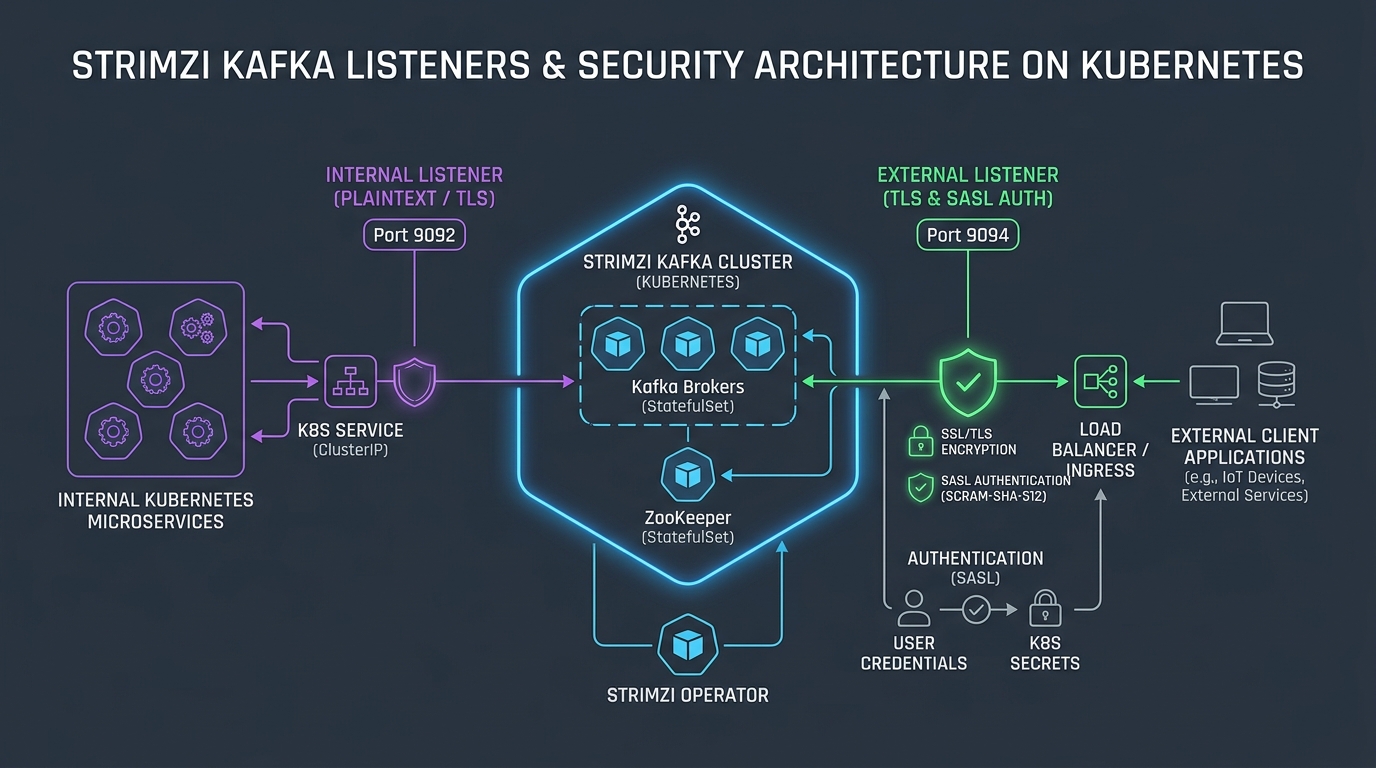
Strimzi separates listeners into two distinct categories:
- Internal Listeners (
type: internal):- Target: Microservices running inside the same Kubernetes cluster.
- Routing: Uses Kubernetes
ClusterIPServices. - Default Port:
9092(Plaintext) or9093(TLS).
- External Listeners (
type: nodeport/loadbalancer/ingress/route):- Target: Producer/Consumer applications running outside Kubernetes (e.g. IoT devices, legacy servers, multi-cloud services).
- Security: Enforces mTLS or SASL authentication (SCRAM-SHA-512 / OAuth 2.0).
- Routing: Strimzi automatically provisions external load balancers or NodePorts and injects external bootstrap metadata.
4. Hands-On Tutorial: Deploying Kafka with Strimzi Step-by-Step
Let’s walk through deploying a fully functional Kafka cluster using Strimzi in 5 easy steps.
Step 1: Install the Strimzi Cluster Operator
Apply the latest Strimzi installation bundle into your cluster:
# Create a dedicated namespace for Kafka
kubectl create namespace kafka

# Apply Strimzi CRDs and Cluster Operator deployment
kubectl apply -f 'https://strimzi.io/install/latest?namespace=kafka' -n kafka

# Verify the Cluster Operator pod is running
kubectl get pods -n kafka
Step 2: Deploy a 3-Node Kafka Cluster
Save the following manifest as kafka-cluster.yaml and apply it:
kubectl apply -f kafka-cluster.yaml -n kafkaCheck cluster initialization progress:
kubectl get kafka -n kafka
kubectl get statefulsets -n kafka
Step 3: Create a Kafka Topic
Create your first topic (payment-events):
kubectl apply -f kafka-topic.yaml -n kafka

# Verify topic creation via Strimzi
kubectl get kafkatopic -n kafka
Step 4: Produce Messages Using Strimzi Console Producer
Strimzi includes built-in utility containers to test message streaming immediately:
# Start an interactive producer session
kubectl run kafka-producer -ti --image=quay.io/strimzi/kafka:0.40.0-kafka-3.7.0 --rm=true --restart=Never -n kafka -- bin/kafka-console-producer.sh --bootstrap-server dev-kafka-cluster-kafka-bootstrap:9092 --topic payment-events

# Type test events:
> {"orderId": 1001, "amount": 250.00, "currency": "USD"}
> {"orderId": 1002, "amount": 49.99, "currency": "EUR"}
Step 5: Consume Messages in Another Terminal
Open a new terminal tab and start a console consumer:
kubectl run kafka-consumer -ti --image=quay.io/strimzi/kafka:0.40.0-kafka-3.7.0 --rm=true --restart=Never -n kafka -- bin/kafka-console-consumer.sh --bootstrap-server dev-kafka-cluster-kafka-bootstrap:9092 --topic payment-events --from-beginning

# Output:
# {"orderId": 1001, "amount": 250.00, "currency": "USD"}
# {"orderId": 1002, "amount": 49.99, "currency": "EUR"}
5. Production Best Practices for Engineers
When promoting Strimzi Kafka clusters to production, follow these battle-tested architectural guidelines:
1. Enforce Pod Anti-Affinity & Rack Awareness
Never run multiple Kafka broker pods on the same physical worker node or in a single Availability Zone (AZ). Use K8s podAntiAffinity and rack topology keys:
spec:
  kafka:
    rack:
      topologyKey: topology.kubernetes.io/zone
    template:
      pod:
        affinity:
          podAntiAffinity:
            requiredDuringSchedulingIgnoredDuringExecution:
              - labelSelector:
                  matchExpressions:
                    - key: strimzi.io/name
                      operator: In
                      values:
                        - dev-kafka-cluster-kafka
                topologyKey: kubernetes.io/hostname
2. Configure Proper JVM Memory Limits
Kafka runs inside the JVM. Set container cgroup memory limits higher than the JVM heap size to allow headroom for OS page cache (which Kafka relies on heavily for fast log reads):
$$\text{Container Memory Limit} \approx \text{JVM Heap Size} \times 2$$
resources:
  requests:
    memory: 4Gi
    cpu: "2"
  limits:
    memory: 8Gi
    cpu: "4"
jvmOptions:
  "-Xms": "4g"
  "-Xmx": "4g"
3. Set min.insync.replicas for Zero Data Loss
To guarantee no message loss during broker failures:
- Set topic
replicas: 3. - Set
min.insync.replicas: 2. - Configure producers with
acks=all(acks=-1).
Summary & Developer Takeaways
- No More Manual Toils: Strimzi transforms Apache Kafka cluster administration from fragile CLI runbooks into version-controlled Kubernetes manifests (
CRDs). - Separation of Concerns: The Cluster Operator manages infrastructure pods, the Topic Operator manages partition schemas, and the User Operator automates security/ACLs.
- GitOps Friendly: Every topic, ACL rule, and broker configuration can live inside your Git repository and deploy automatically via ArgoCD or Flux.